

Integration Services

Active Directory Integration | Integration Services

We let your users sign in with a single identity using their existing Active Directory accounts.

Active Directory Integration – image 1
Active Directory Integration – image 2

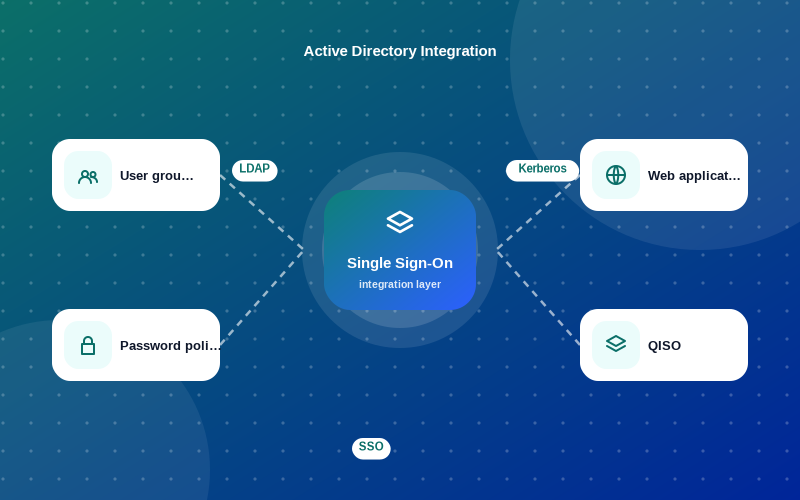
We enable single sign-on to your applications with existing Active Directory accounts, map AD groups to application roles and keep the account lifecycle aligned with AD. Deliverables include the working integration, a role mapping table and an operations document.

One password for users, one control point for admins

Keeping a separate username and password for each application tires users and raises security risk. Once integrated sign-in with Active Directory is in place, people enter the application directly with their corporate session. Because rules such as password policy, lockout and multi-factor authentication are managed on the AD side, the IT team keeps control from a single point.

From AD groups to application roles

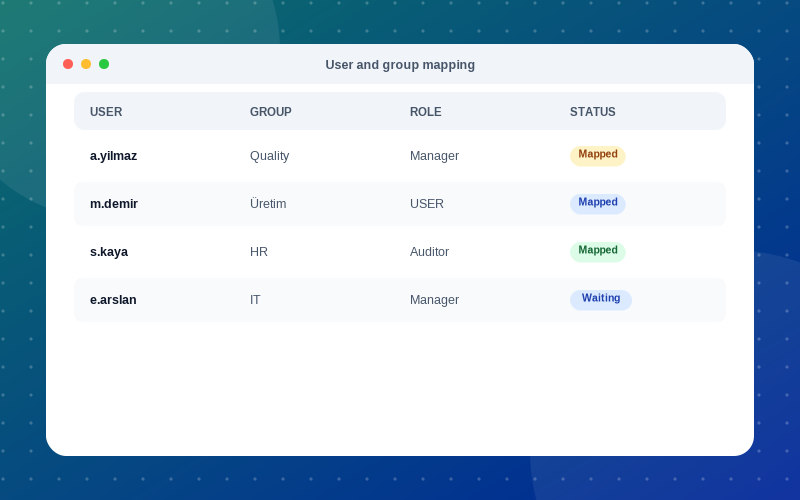
Authenticating someone is not the same as authorizing them. What each person can do in each module is determined by a mapping table based on AD security groups; for example a quality manager group receives approval rights and an auditor group receives read-only rights. When a person is added to or removed from a group, their rights in the application update without extra administration.

External access, fallback and account lifecycle

Users reaching the application from outside the corporate network can be authenticated through VPN, a reverse proxy or federation solutions; we determine which route suits your organization based on your existing infrastructure. What happens when AD is unreachable is designed too. Disabled or locked accounts cannot sign in to the application either, while the work history of deleted accounts is preserved.

What is included?

  • Integrated sign-in: Enabling users to enter the application with their corporate session using Windows integrated authentication or a federation-based approach.
  • Group-based role mapping: Mapping AD security groups to application roles and rights through a written table and reflecting group changes automatically.
  • Profile synchronization: Synchronizing directory attributes such as name, email, department and manager with the application's user record.
  • Account lifecycle: Setting up rules that cut application access for disabled, locked or expired AD accounts while preserving work history.
  • Access scenarios: Designing and documenting internal, VPN and external access cases, plus the fallback sign-in approach to apply when AD is unreachable.

How we work

  1. Discovery

    We examine your AD forest and domain structure, user and group layout, existing authentication protocols and the environment hosting the application, and clarify the target user base and access conditions with you.

  2. Planning

    We design the role mapping table, attribute mapping and session behavior, and define with your IT team the least-privilege rights and secure password storage requirements for the service account.

  3. Implementation

    We test the integration in a test environment with different group and account states, verifying cases such as a locked account, an expired password, multiple group membership and an AD outage, and record the results.

  4. Support

    We go live with a pilot user group, adjust based on feedback and then open access to all users; finally we hand over the operations document, incident investigation steps and change process.

What you gain

Users enter the application without remembering an extra password; with fewer password reset requests the support load eases, and identity policies are enforced from a single center.

Rights are updated with AD group membership; access for someone who leaves or changes role closes without delay, and a consistent record is created to show in access reviews.

What happens during an AD outage or network issue is defined in advance; authentication stops being a single point of failure and incident investigation becomes easier.

Who is it for?

This service suits IT and security teams that use Active Directory internally and want their new applications to work with the same identity. It is aimed especially at organizations with many users and frequent access changes, or those that must show consistent records in access reviews.

Frequently Asked Questions

Does the application server need to be joined to the domain for Active Directory integration?

It depends on the chosen method. Windows integrated authentication usually requires the server to be domain-joined, whereas with LDAP queries or federation-based methods, network access and a service account may be enough. We review your infrastructure and recommend, with reasoning, the method that needs the fewest changes.

What happens if the person signing in is not in AD, for example an external stakeholder or supplier?

For these users the application's own local accounts or a separate external user registry can be used. Which users sign in with AD and which with a local account is determined separately in the authorization design; stricter roles and tighter password and verification rules can be applied to external accounts.

Related services and resources

Quote & demo

Let's evaluate your project together.

Let's start with a short call about QISO demo, ISO consulting, Artificial intelligence feasibility or your custom software needs.

  • QISO demo
  • ISO consulting
  • Artificial intelligence
  • Custom Software